The workflow comes before the feature list
We model the repeated task, the interruptions and the information needed at each decision. Features only stay when they reduce friction or create measurable value.
Turn a useful idea or difficult workflow into software people can rely on every day.
Product strategy, interface design and application development for iOS, Android and Windows, including connected services, offline workflows and cross-platform products.WHO THIS IS FOR
Product strategy, interface design and application development for iOS, Android and Windows, including connected services, offline workflows and cross-platform products.
WHY WE ARE DIFFERENT
We treat an app as a complete product rather than a collection of screens. User journeys, platform conventions, data, permissions, offline behaviour, APIs, testing and release planning are considered together. You work directly with the designers and developers making those decisions, so the interface is not handed to a separate team to reinterpret.
We model the repeated task, the interruptions and the information needed at each decision. Features only stay when they reduce friction or create measurable value.
Native iOS, Android or Windows development can provide the closest platform fit. Shared-code approaches can reduce duplication. We explain the trade-off before the architecture hardens.
Authentication, permissions, accessibility, telemetry, store requirements, testing and support are planned early rather than discovered at submission time.
THE TECHNOLOGY NOW
Modern applications are rarely isolated. They combine a focused interface with identity, cloud or on-premise services, device capabilities and dependable synchronisation. The key decision is no longer simply native versus cross-platform; it is which parts must feel deeply at home on the device and which parts benefit from being shared.
SwiftUI and Apple frameworks support adaptive interfaces, accessibility and deep device integration, but the experience still needs to respect navigation, privacy and interaction conventions.
Material guidance, responsive layouts and careful testing help one product work across different screens, performance levels and manufacturer environments.
Windows App SDK and WinUI support contemporary desktop experiences while retaining access to files, hardware and established business environments.
Business rules, networking and data can often be shared, while platform-specific interaction and capability remain native where that improves quality.
WHERE IT IS GOING
Applications are moving towards more capable local processing, richer accessibility, tighter continuity between devices and selective AI assistance. Products built around clear domain logic and documented service boundaries can adopt those capabilities without replacing the interface every time a platform changes direction.
We plan for likely change without making your project depend on a prediction.More useful on-device processing for privacy, speed and resilience when connectivity is limited.
Adaptive interfaces that serve phones, tablets, desktop windows and assistive technologies from a coherent design system.
Passkeys and stronger platform identity reducing password friction while improving account security.
AI features appearing inside bounded workflows rather than as a generic chat window added to every screen.
CUSTOM VS OFF-THE-SHELF
An app builder can validate a straightforward form or directory quickly. Custom product work is the better route when the workflow, data, device capability, offline behaviour or long-term roadmap makes the software part of your competitive or operational advantage.
Prebuilt components move quickly but may force a generic navigation and interaction model across every device.
The product uses the conventions and capabilities people already understand on each target platform.
Connectors work within the platform's supported fields, limits and commercial plan.
The data model, API and synchronisation rules are built around the real responsibilities of the product.
Fast to launch, but unusual requirements and distribution decisions remain tied to a vendor roadmap.
Architecture, source and release knowledge stay understandable, testable and ready for the next product decision.
We will say when an existing product is the sensible answer. Custom work should earn its place through fit, control, integration or long-term value.
HOW WE HELP
You can engage us for one focused capability or a joined-up delivery. We shape the work around the outcome, handover and level of support you need.
Product design and development for iPhone and iPad, with Apple platform behaviour, privacy and release requirements considered from the start.
Responsive Android products designed for the real device range, permissions, accessibility and Play distribution.
Focused desktop tools and connected products for modern Windows environments, files, hardware and operational workflows.
Shared services and carefully selected shared-code layers where they reduce cost without flattening the user experience.
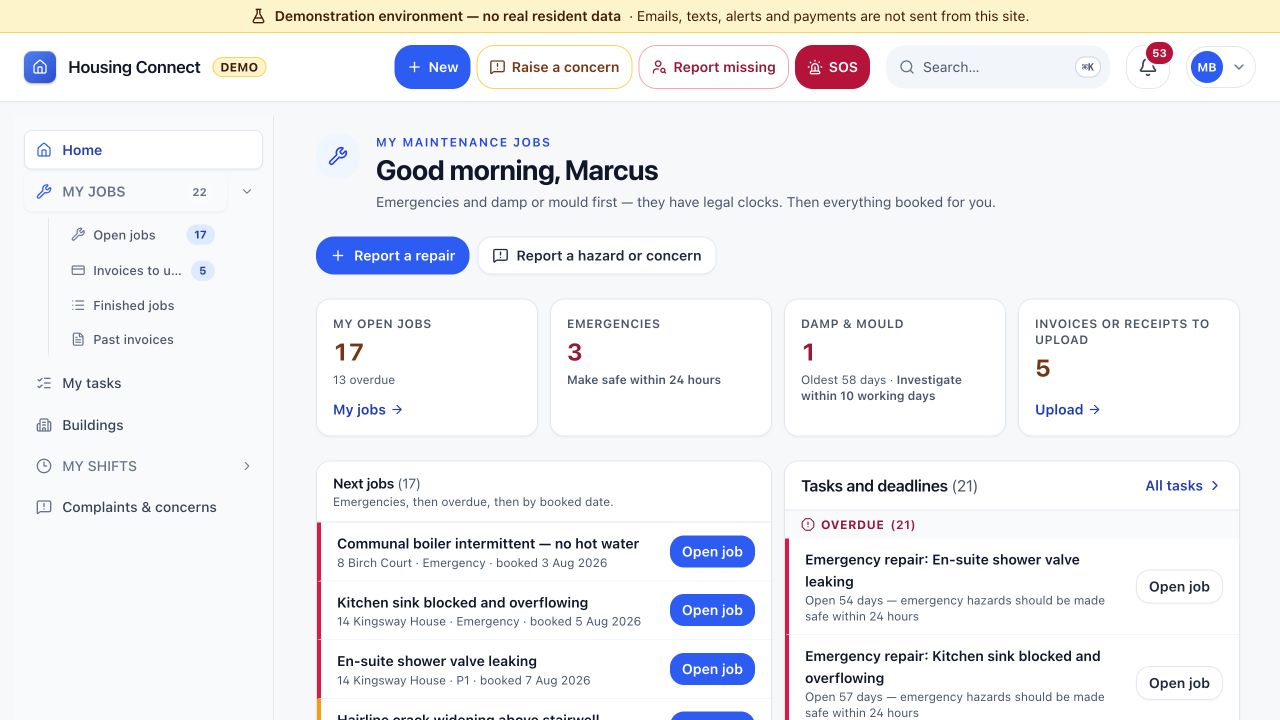
ROLE-BASED APPLICATION
Housing Connect demonstrates how a complex service can become focused software with different workspaces for different responsibilities.
View the demonstration platform ↗HOW WE WORK
Identify the user, repeated task, constraints and measurable result the first release must deliver.
Test navigation, terminology and the difficult moments before investing in production code.
Build the app, services, identity, data and platform integrations as one tested system.
Prepare distribution, monitor real use and improve the workflow with evidence rather than assumptions.
PRACTICAL QUESTIONS
Yes. We agree the deliverables, acceptance criteria and handover for a focused engagement or combine it with other disciplines where useful.
An outline of the goal, existing materials, important dates and any technical or commercial constraints. Confidential details can wait until suitable terms are agreed.
Fees depend on scope and delivery requirements. We provide a proposal before work starts, including responsibilities, assumptions, third-party costs and tax treatment.
A CLEAR NEXT STEP
Bring the current workflow, product or technical problem. We will help define the sensible route, what should stay off-the-shelf, where custom work earns its place and how to prove value before scaling.
Start the conversation ↗